IAM Privilege Escalation Risk (IAM PE Risk)
IAM privilege escalation risk detection is currently offered as a Beta. It is available from the IAM PE Risk menu in the Risk Management group on the left of the console.
IAM Privilege Escalation Detection looks at the combination of IAM users, roles and policies and finds attack paths through which one principal can escalate to higher privileges.
Beyond simply listing permissions, it presents the Attack Path, Blast Radius, Evidence and Remediation together.
1. Prerequisites
This feature works once IAM data has been synchronized. Complete Sync IAM Graph in the Asset Graph first.
Without IAM data the analysis fails and the message Analysis failed. Check if IAM data is synced. is shown. In that case, run the asset graph synchronization first.
2. Running an analysis
Location: Project > Risk Management > IAM PE Risk
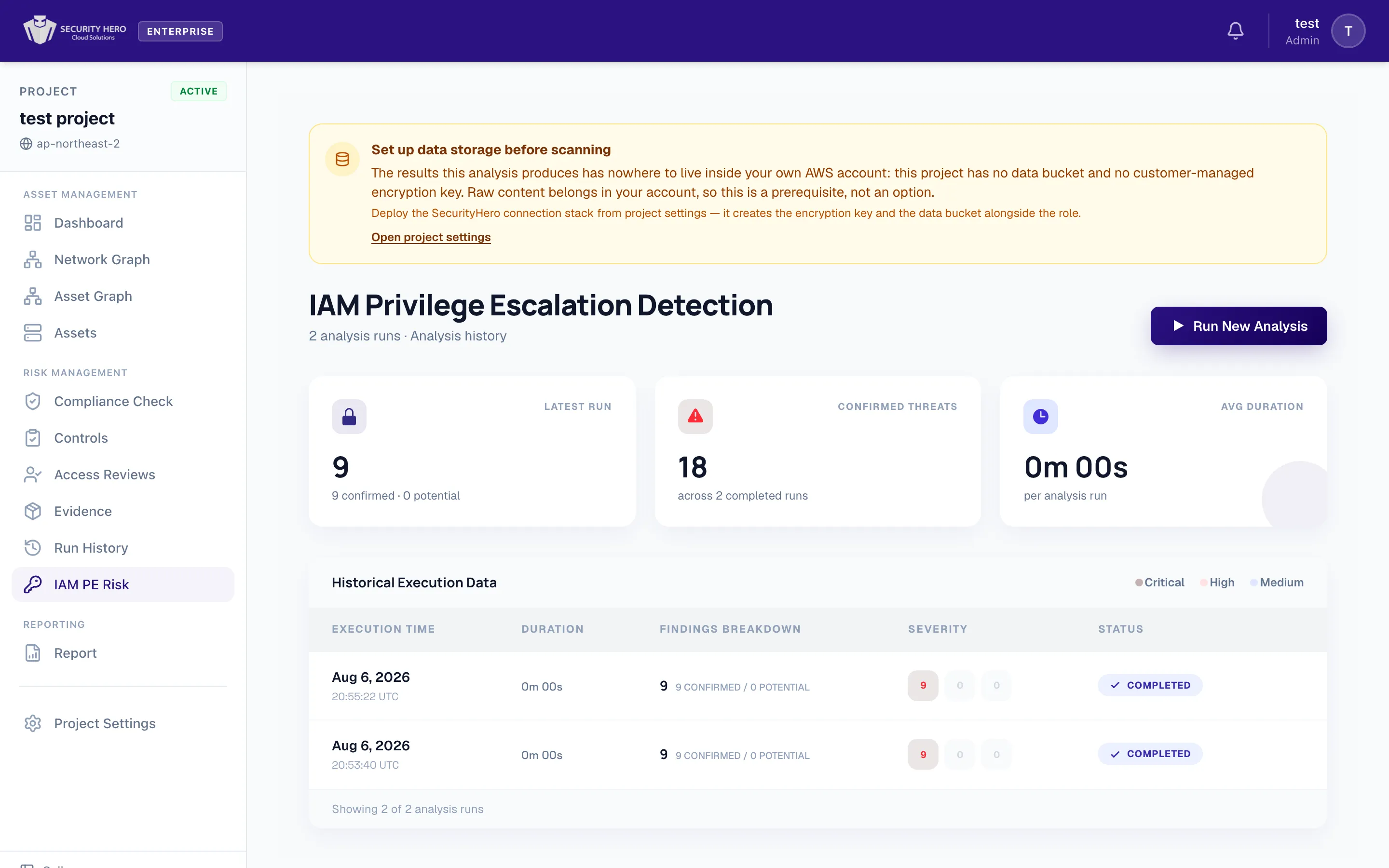
- Start an analysis with the Run New Analysis button at the top of the landing page. While it runs, it shows Analyzing…; when it finishes, you are taken to that run's detail page.
- If there is no run history yet, an empty-state message and a Run Analysis button are shown.
3. Run history (History)
Analyses are recorded per run. The landing page shows the following.
- Summary cards
Latest Run– number of findings in the most recent run (confirmed · potential)Confirmed Threats– total confirmed threatsAvg Duration– average duration
- Run history table – columns:
Execution Time,Duration,Findings Breakdown,Severity,Status- Status:
Running/Completed/Failed/Pending - Severity legend:
Critical/High/Medium
- Status:
4. Finding details (Findings)
The run detail page consists of a finding list on the left and a deep-dive on the right. You can filter by severity and status (Confirmed / Potential).
Each finding provides the following information.
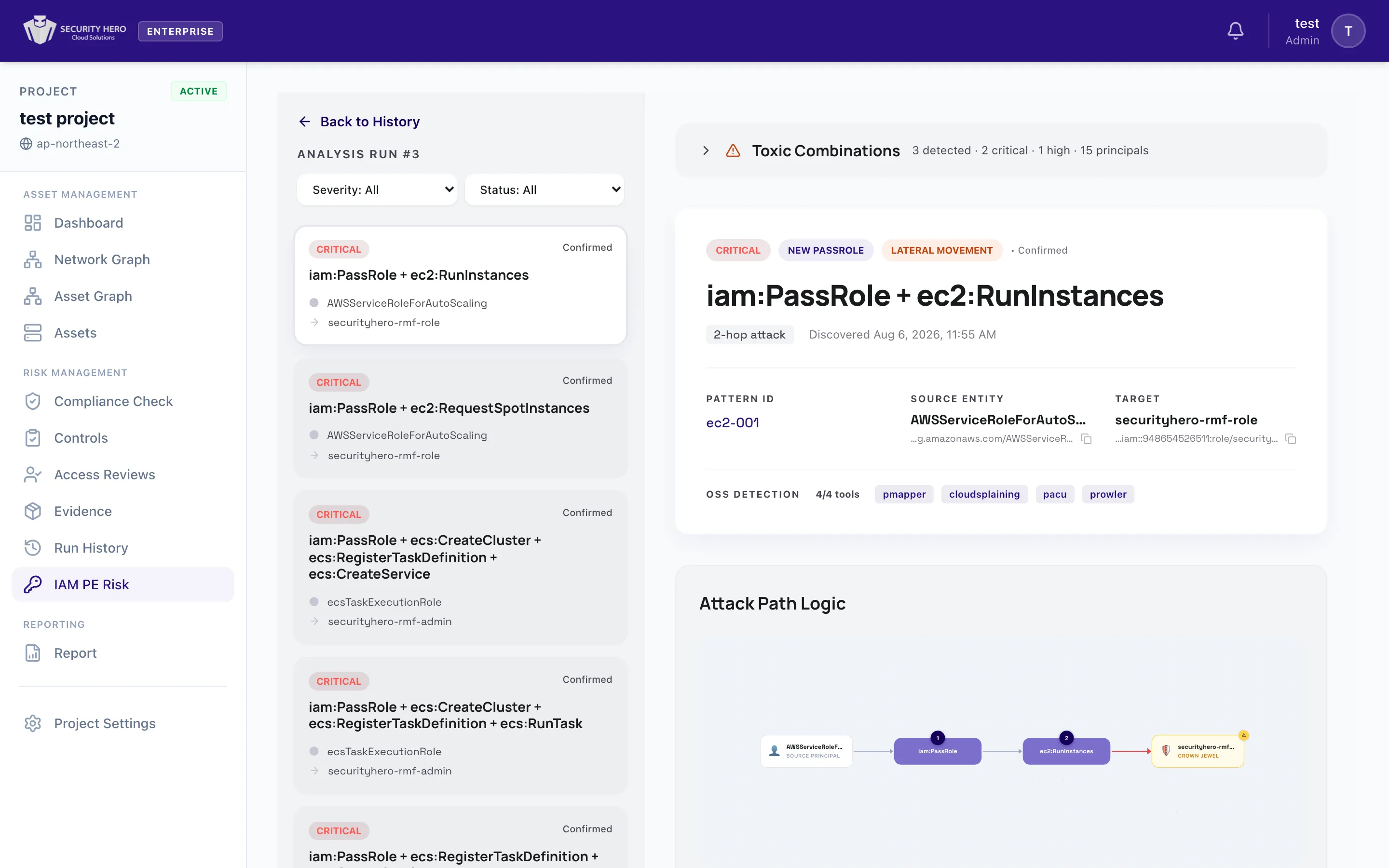
4.1. Finding summary (Finding Header)
- Severity and type:
Self Escalation,Principal Access,New PassRole,Existing PassRole - Access level:
Admin Compromise(takeover of administrator privileges) orLateral Movement - Confirmation:
Confirmed/Potential– the classification made at detection time. Whether the path really works under the account's authorization rules is reported separately by the path grade. - Path grade:
Decided/Decided (SCP not checked)/Candidate/Blocked(section 5) - Number of attack hops (
N-hop attack),Pattern ID,Source Entity,Target(ARN) - OSS Detection: how many of the open-source tools (
pmapper,cloudsplaining,pacu,prowler) detected the same risk (N/4 tools). A new risk that none of the tools detected is markedNovel Detection.
4.2. Attack path (Attack Path Logic)
Visualizes the escalation path as a graph and step-by-step explanation. It shows the actions and flow from the starting principal (Source Principal) to the target asset (Crown Jewel).
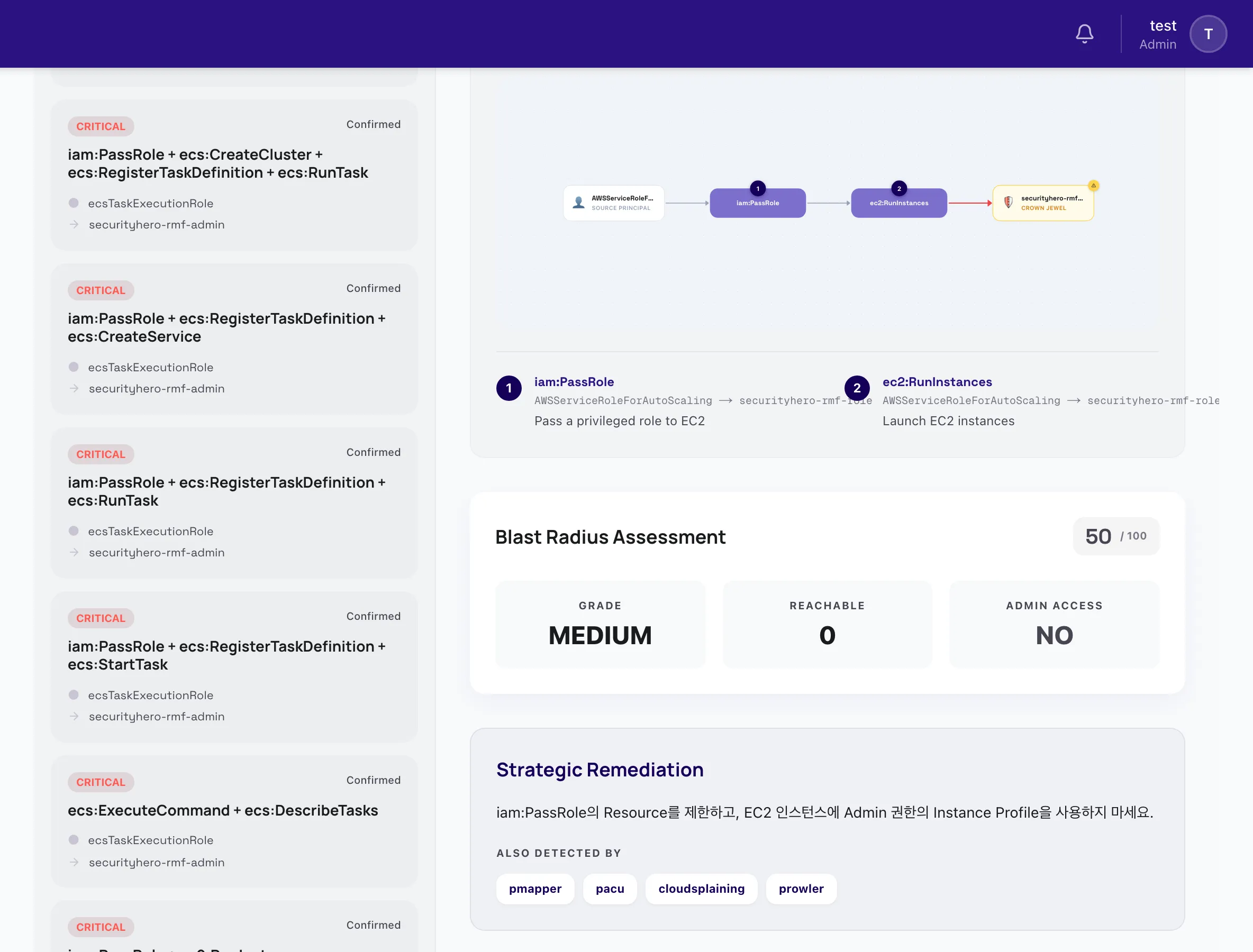
4.3. Blast radius (Blast Radius Assessment)
Rates the impact of a successful attack with a score (/100) and a grade (Grade).
- Whether administrator access can be reached is shown as
Reachable/Admin Access - If administrator access can be reached, the warning
Can reach admin — full account compromise possibleis shown.
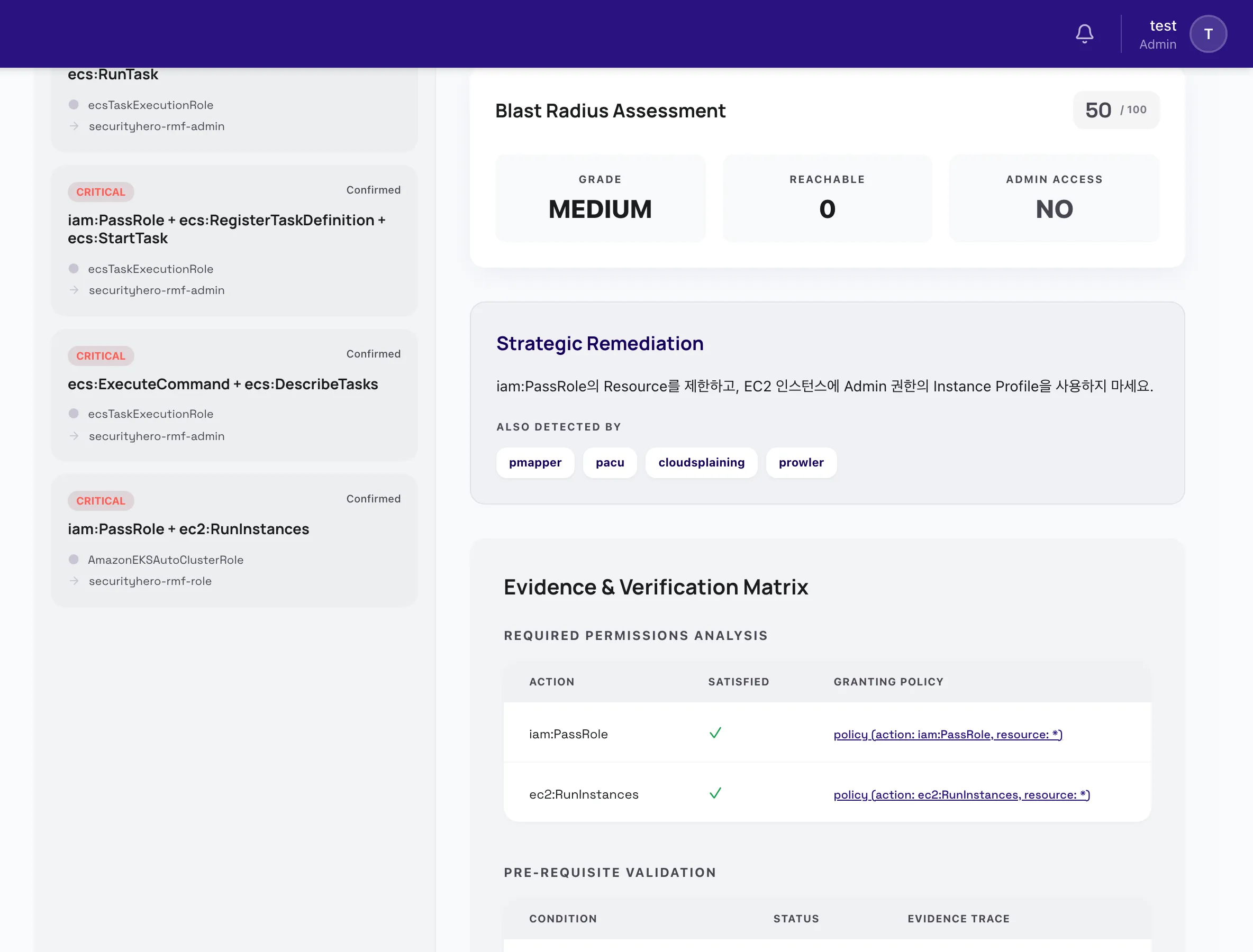
4.4. Remediation (Strategic Remediation)
Presents recommended actions to block the privilege escalation, along with the open-source tools that detected the same risk.
4.5. Evidence matrix (Evidence & Verification Matrix)
Provides, as tables, the grounds on which the finding actually holds.
- Required Permissions Analysis –
Action/Satisfied(whether it is met) /Granting Policy(the policy that allows it) - Pre-requisite Validation –
Condition/Status(Passed/Unverified) /Evidence Trace
5. Path grades
The fact that a combination of permissions exists does not tell you whether the path can really be used, because an account has several layers of rules that can stop it. IAM PE Risk breaks each path into steps (principal, action, target), applies the account's real policies to every step in the order AWS uses to decide a request (AWS policy evaluation logic), and gives each path a grade from the result.
5.1. What is evaluated
Each step is evaluated against all of the following together.
- Identity policies – policies attached directly to the user or role, attached managed policies, and the policies of its groups
- The permissions boundary
- The organization's SCPs (service control policies) and RCPs (resource control policies)
- Explicit denies (Deny) and
Conditions in every policy - For a step that assumes a role (
sts:AssumeRole), the role's trust policy. A chain of consecutive role assumptions (2 to 3 hops) is evaluated hop by hop, each with that hop's calling principal.
The threat is assumed as follows. A user is assumed to call with a leaked long-term access key, so the request carries no MFA information (a user path is blocked by a deny that requires MFA). For a role the session context is unknown, so MFA conditions are not settled.
5.2. The four grades
| Grade | Meaning | Basis |
|---|---|---|
| Decided | It is settled that every step of the path is allowed by the account's policies. The path can be used now. | Every step was evaluated exactly and nothing stops it. |
| Decided (SCP not checked) | Every policy that was evaluated allows it. However, the organization's SCPs could not be seen, so SCPs are not included. The path can be used unless an organization SCP stops it. | The only thing not settled is that the organization SCPs (including RCPs) were not read. |
| Candidate | The path may be dangerous, but some steps could not be evaluated exactly. Whether it really works is not yet decided. | Whatever was unknown was widened towards "may be allowed". No step is definitely denied. |
| Blocked | A step is definitely denied by a policy, so this path cannot be used to escalate. | An explicit deny applies, or no policy allows the step at all. |
The grading order is as follows. If any step is definitely denied, the path is Blocked even if the other steps are not fully known. If every step is allowed and all were evaluated exactly, it is Decided. If every step is allowed and the only unknown is the organization SCPs, it is Decided (SCP not checked). Anything else is a Candidate.
A candidate is a path whose exploitability could not be ruled out. It is neither judged safe nor confirmed as exploitable. Because unknown parts are widened towards "allowed" so that a dangerous path is never wrongly called safe, some candidates may not actually work. Resolving the needed to decide items on a candidate turns it into Decided or Blocked.
5.3. When a path stays a candidate
A step cannot be settled, and the path stays a candidate, in cases such as these.
- A condition cannot be computed exactly – operators such as wildcard, numeric, date or IP operators,
ForAnyValue/ForAllValues, policy variables (${...}), or a condition key whose request value is unknown - A statement whose range is unknown, such as
NotAction - A policy document or a role's trust policy was not collected, or the attack target cannot be narrowed to one resource
- A path that includes a step run by a service (section 5.5), or a cross-account path whose caller account is not connected
5.4. Ordering and filters
- The list is ordered Decided → Decided (SCP not checked) → Candidate → Blocked. Within a grade, AWS-managed roles come last, then severity order.
- The Grade filter shows only the grades you choose. Blocked paths are collected in a collapsed section.
- If the inputs are incomplete (for example a policy could not be read), the paths of that run are not graded and a warning
Paths of this run could not be gradedis shown, because grading only some of them would look like a complete evaluation. The findings and their severities are not affected. - When the grounds of a verdict change (policies, connection state) and the grade changes, the change is recorded in the history and a change notification may be sent.
5.5. Path families the grading applies to
| Family | Description | Highest grade |
|---|---|---|
Self escalation (Self Escalation) | A principal changes its own (or its group's or policy's) permissions with IAM actions. | Decided |
Principal access (Principal Access) | Obtains the credentials of another user or role, or assumes that role. | Decided |
New / existing PassRole (New PassRole, Existing PassRole) | Passes a role to a service so that the service runs code as that role. | Candidate |
For the PassRole families, only whether all the needed permissions are held and whether the role trusts the service are evaluated. The step in which a service runs code cannot be decided by authorization rules, so these families never become Decided and stay Candidate at most. If a step is definitely denied, the path is Blocked.
6. Exact decision rates and the SCP badge
The summary at the top of the run detail page shows:
- Decided (exact decision rate) – the share of all paths that are
DecidedorBlocked. It counts only paths settled strictly by the authorization rules, and does not includeDecided (SCP not checked). - Decided excl. SCP – the share of all paths that are
Decided,Decided (SCP not checked)orBlocked. It shows how much was settled apart from not seeing the organization SCPs. - SCP checked / SCP not checked badge – whether this run took the organization SCPs into account. Hover over "not checked" to see the reason.
How this decision rate was measured against public path catalogs and a vulnerable environment is described in Public Benchmarks.
To see SCPs
SCPs can be read only when the organization's management account is connected. Without it the badge reads The organization management account is not connected, so SCPs could not be seen, and paths that end in "allowed" become Decided (SCP not checked) or Candidate. Connect the management account as described in Organization and run the analysis again.
- Analyzing the management account itself – SCPs do not apply to principals of the management account. The run is marked
SCP checkedwith no SCP layer (RCPs still apply). - SCPs of some organization levels could not be read – no conclusion is drawn from a partial set of SCPs, and the run stays
SCP not checked.
7. How to read the evidence of each step
Evaluated Steps in a finding lists the steps of the path in order, with the principal, action, target resource and result of each.
| Display | Meaning |
|---|---|
| Allowed | The step is allowed at every layer. |
| Denied | The step is definitely denied. See Blocked by below. |
| Not decided (dashed) | The step was assumed to be allowed but could not be evaluated exactly. The reason is shown as Not decided: reason. |
| Tag write | The principal can change its own tags to satisfy a tag condition, so the write is included as a step. It appears only in that case. |
A blocked step
A denied step shows Blocked by.
- Layer –
Identity policy/Permissions boundary/SCP/RCP/Trust policy - Policy and Sid – the name and statement ID of the policy that stopped it. For an explicit deny, this points to the statement that applied.
- A step can also be stopped not by an explicit deny but because no statement in that layer allows the request. Examples: the action is not in the permissions boundary, the identity policies do not allow it, one SCP level has no allow.
Undecided reasons and what is needed to decide
A candidate and a Decided (SCP not checked) path list what is needed to decide this path.
| Undecided reason | What is needed |
|---|---|
| A policy layer was not visible | Connect the organization management account (SCP/RCP), or collect the policies of the other account |
| A condition that cannot be evaluated exactly | Settle the value of that condition key and operator |
| A request context value is unknown | That request context value |
| A policy variable | Settle the variable's value |
The range of a NotAction is unknown | Settle the range of that policy statement |
| A policy document or role trust policy was not collected | Collect the policy document or trust policy (sync the Asset Graph) |
| The attack target is not resolved | Resolve the target resource |
| A step run by a service | Outside what is evaluated (cannot be resolved) |
Resolve what is needed and run the analysis again; the grade changes.
8. AWS-managed roles
A service-linked role under the aws-service-role/ path is shown as AWS-managed role. Only the AWS service it belongs to can assume it, so a person or outside attacker cannot obtain its credentials directly, and AWS defines its policies. Such a role is never the starting point of an escalation path (it can still appear as the target of another principal's path). Paths whose target is an AWS-managed role sort last within a grade, and the Hide AWS-managed roles filter removes them from the list.
9. Blocking policy draft
In the remediation section of a Decided or Decided (SCP not checked) path you can create a draft policy that blocks the path. It cannot be created for a Candidate or Blocked path; for a candidate, what is needed to decide it is shown instead.
It gives you the draft, the commands to apply it and how to roll it back, but it never creates or attaches a policy in your account. The party named below applies it. The draft and its check results are kept in your own account's storage.
9.1. Kinds of draft
The draft is a policy that denies (Deny) the steps of the path. It contains no allows.
| Kind | When | Applied by | Content |
|---|---|---|---|
| SCP draft | A member account of an organization whose SCPs were read | The organization management account (attaches the SCP to the account) | A deny that applies only to that principal (ARN). The connection role and OrganizationAccountAccessRole are exceptions so that account management is not locked out. |
| Identity policy draft | A standalone account (no organization found), an account whose SCPs were not read, or the management account itself (SCPs do not apply to it) | The account's IAM administrator | A deny attached to that principal as an inline policy |
A Decided (SCP not checked) path has no known place to attach an SCP, so an identity policy draft is the default.
9.2. The three checks
Each draft gets three checks, shown as passed / failed / not run / attention. If any check fails, the whole result is failed; if a check could not run, the whole result is not run.
- AWS check (Access Analyzer) – a real AWS call.
- SCP draft:
ValidatePolicychecks syntax and AWS security warnings. Only the draft document is sent to AWS, and your credentials are not used. It passes when there are no errors or security warnings. - Identity policy draft:
CheckAccessNotGrantedchecks that "the principal's existing identity policies combined with the draft allow none of the path's steps". It is called with the connected account's credentials.
- SCP draft:
- Engine re-evaluation – not an AWS call. It recomputes the path with the draft added, using the same authorization rules that graded the path, and checks that the path becomes
Blockedbecause of this draft. The screen states that this is not an AWS check. - Side effects – lists the (principal, action) pairs that other principals of the same account newly lose because of this draft. Anything found is shown as
attentionwith the affected principals. It is not a failure but something to review before applying.
The draft contains only denies, so it creates no new access. But it blocks only the steps of this path. Other escalation paths, or other actions that reach the same result, can remain. Passing the checks does not mean the account is safe; after applying it, run the analysis again and check the result.
9.3. Applying and rolling back
- SCP draft – create the policy in the management account (
aws organizations create-policy) and attach it to the account (attach-policy). To roll back, detach it from the account (detach-policy, takes effect immediately) and delete it once nothing is attached. - Identity policy draft – attach it to the principal as an inline policy (
aws iam put-user-policyorput-role-policy). To roll back, delete the inline policy (takes effect immediately).
The commands are shown as is on the draft screen.
9.4. When the connection stack must be updated
The AWS check for an identity policy draft (CheckAccessNotGranted) runs only when the connected role has the access-analyzer:CheckAccessNotGranted permission. The latest connection template includes it, so an account connected with an older template must update its CloudFormation Stack (see Project Settings). Without the update this check shows not run (permission missing) and the other checks run as usual. A check that could not run is never shown as passed.
10. Cross-account paths
Paths where a principal in another account assumes a role in this account (sts:AssumeRole) are graded too.
10.1. Where they appear
- A path appears as a row in the analysis of the account that owns the role.
- The row carries a cross-account badge and the ID of the caller account (the account of the principal that wants to assume the role). You can filter by the cross-account family.
- If the caller account is not connected, the row is a
Candidateand needed to decide showsConnect account <ID>. Connect that account and run the analysis again to change the grade.
10.2. Grading
The four grades apply unchanged, and the layers of both accounts are evaluated together.
| Side | What is evaluated |
|---|---|
| Caller account | The caller principal's identity policies, permissions boundary, and the SCPs that apply to the caller account |
| Role | The role's trust policy and its conditions |
| Role account | Explicit denies in the RCPs that apply to the role's account |
If the policies of both accounts were read, the path can be Decided; if either side definitely denies, it is Blocked.
A sts:ExternalId condition in the trust policy is not counted as blocking a cross-account path, because an attacker who holds the caller's credentials can supply any ExternalId value. ExternalId protects against a third-party service being tricked into assuming another customer's role; it is not a defense against leaked credentials.
10.3. Blocking policy drafts
The blocking policy draft of a cross-account path attaches on the caller's side.
- SCP of the caller account – when the caller account is an organization member and its SCPs were read. The management account applies it.
- Identity-policy deny on the caller principal – in other cases. The caller account's IAM administrator applies it, and the checks run with the caller account's connection.
So a draft cannot be created for this path while the caller account is not connected.
11. AWS native results lane
This section shows the results that the AWS security services in the customer's account already produce, next to the path verdicts. Its purpose is to see where our verdict and AWS disagree.
This lane is excluded from the risk score, MTTR and remediation rates. It also leaves the existing finding totals unchanged and is shown separately for reference.
11.1. Sources and statuses
| Source | What is read |
|---|---|
| IAM Access Analyzer | External-access findings and unused-access findings |
| Security Hub | Active control findings about IAM users, roles, policies, groups and access keys, and network exposure |
| GuardDuty | Threat findings about the activity of IAM principals |
| Inspector | Counts only, by severity (no finding rows are fetched) |
Sources are read with the connection role, in the connection region. Each source shows its own status.
| Status | Shown as | Meaning |
|---|---|---|
| Measured | counts | The source answered and its findings were read. |
| Collecting | Collecting… | The findings are being read right after the analysis. This usually changes within a minute; if it is still shown after 10 minutes it is reported as an error. |
| Not measured (not enabled) | Not measured | The service is not turned on in that account and region: no analyzer, Hub not subscribed, no detector, Inspector disabled. |
| Not measured (permission missing) | Not measured | The connection role was refused the API. |
| Not measured (error) | Not measured | Any other error, such as throttling or a timeout. It is tried again at the next analysis. |
A source that could not be measured is shown as Not measured, not as "0 findings". A failure in one source does not affect the others or the analysis. Up to 1,000 findings are read per source; beyond that the result is marked as truncated.
Reading the unused-access findings of Access Analyzer requires the access-analyzer:ListFindingsV2 permission on the connection role. The latest connection template includes it, so accounts connected with an older template must update their CloudFormation stack (see Project settings). Until then the unused-access part of Access Analyzer shows Not measured (permission missing), while external-access findings are still read.
11.2. Severity
Source scales are mapped onto one five-level scale (CRITICAL / HIGH / MEDIUM / LOW / INFORMATIONAL).
- Security Hub – the severity label of the source is used as is.
- GuardDuty – a score of 9.0 or above is
CRITICAL, 7.0–8.9HIGH, 4.0–6.9MEDIUM, and lower scores map to the lower levels. - Access Analyzer – the source has no severity, so external access is
MEDIUM(HIGHwhen the resource is public) and unused access isLOW. - Inspector – only counts by severity.
11.3. Mismatch cards
Cards show where our verdict and the AWS results disagree. Each card names the policy layer that decided the verdict.
| Card | When it appears | Example |
|---|---|---|
unused_but_exploitable | A role, user or access key that Access Analyzer reports as unused access is the starting principal of a path we graded Decided, Decided (SCP not checked) or Candidate | A role unused for a long time is the start of a path that reaches an administrator role by combining iam:PassRole and lambda:CreateFunction. It is unused, so it is a candidate for removal. |
external_access_vs_engine | An IAM role that Access Analyzer reports as reachable from outside is not flagged as a risk by our verdict | The role trusts another account, but its trust policy has an ExternalId condition and it is not admin-equivalent, so it was not treated as a risk path (layer: trust_condition). Or the path to that role is Blocked by an SCP (layer: scp). |
activity_without_path | The principal GuardDuty reports activity for is the starting principal of none of the paths we found | Unusual API calls by an IAM user are reported, but no escalation path starts from that user. The threat may lie outside escalation paths, or rely on permissions outside the analysis. |
control_failed_but_blocked | Security Hub reports a failed control on a resource, and every path involving it is Blocked | A control failed for a user, but every path involving that user is stopped by the permissions boundary (layer: boundary). |
A card does not say which side is wrong; it points to a difference worth looking into. The explanation shows the grade and the blocking layer together.
12. What is not graded yet
The following are not yet decided by authorization rules. Such paths are at most a Candidate (or Blocked if some step is definitely denied).
- Steps after a service runs – the step where Lambda, EC2, ECS and similar services run code as the role passed to them
- Session tags – tags passed when assuming a role, and conditions on them
- Resource policies in general – policies attached to resources such as S3 bucket policies and KMS key policies (role trust policies are evaluated)
Cross-account paths are now evaluated (section 10). Steps whose caller account is not connected, or whose caller-side policies could not be read, stay candidates.
13. Relationship with the Asset Graph
IAM PE Risk is a separate, dedicated feature from the Permission Insights in the Asset Graph (static analysis of excessive permissions, wildcards and so on).
- The Asset Graph summarizes permission risk per node.
- IAM PE Risk analyses entire privilege escalation attack paths, per run.
The two features are linked: in the Asset Graph, nodes with a privilege escalation risk show the detection result with a ⚡PE badge.